What Content Batching Actually Means
Batching is grouping similar tasks and doing them together, instead of switching between different kinds of work all day. For social media, it means writing all your captions in one block, editing all your visuals in another, and scheduling everything at once — rather than creating one post from scratch each day.
The benefit is not just speed. Every time you switch context — from writing to designing to scheduling — your brain pays a re-focus cost. Social media content batching removes those switches, which is why batched work usually comes out faster and more consistent.
Why One-Post-at-a-Time Is So Slow
Producing a single post daily forces you through the entire pipeline every time: idea, caption, visual, hashtags, review, schedule. You re-enter each mode from cold, and the small frictions add up. You also make each decision in isolation, which is why daily posts often drift in tone and quality.
Batching solves this by letting you stay in one mode long enough to get good at it for the session.
The Batching Workflow, Step by Step
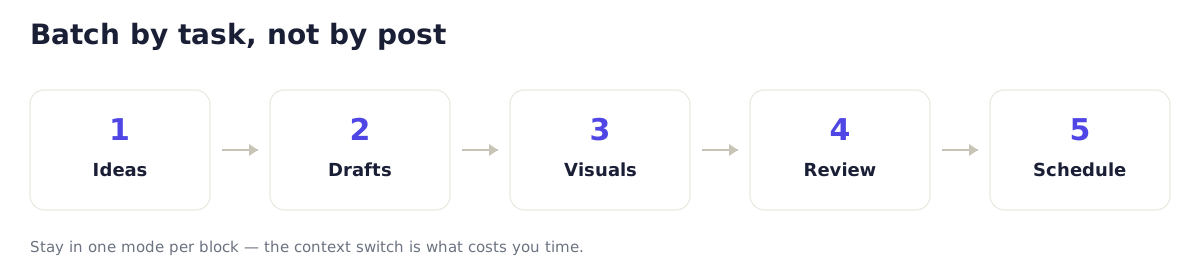
Step 1: Batch Your Ideas
Set aside time to brainstorm many topics at once, grouped by theme or content pillar. Do not write captions yet — just generate a list. Aim to cover two to four weeks in one idea session. If you need a structure for this, see how to plan a month of content.
Step 2: Batch Your Drafts
Write all captions in one sitting while you are warmed up. Working from your idea list, draft each one without stopping to design or schedule. This is where an AI content planning tool fits naturally: generate a first draft per topic, then edit them in a row. CreaticoAI prepares drafts for your review rather than posting them, so you keep control of the final wording.
Step 3: Batch Your Visuals
Create or select all images and video in a separate block. Staying in "design mode" is far faster than switching to it once per post.
Step 4: Batch Your Review
Do a single review pass across everything: check facts, tone, links, prices, and accessibility. Reviewing in one pass makes inconsistencies obvious — you will catch a claim in post 3 that contradicts post 9.
Step 5: Batch Your Scheduling
Queue everything at once through your platform's tools or an authorized scheduler. See how to schedule posts in advance for the mechanics.
A Sample Batching Schedule
| Session | Focus | Frequency |
|---|---|---|
| Idea session | Brainstorm topics by pillar | Monthly |
| Draft session | Write all captions | Every 2 weeks |
| Visual session | Create/select all media | Every 2 weeks |
| Review + schedule | Approve and queue | Every 2 weeks |
You do not need daily touchpoints. A couple of focused blocks every two weeks can keep a consistent account running.
Common Batching Mistakes
- Batching too much at once. A month of drafts in one marathon leads to fatigue and dropping quality. Split drafting into two sessions if needed.
- Skipping the review pass. Batching makes errors easy to catch in one sweep — do not skip it to save time.
- No buffer for timely posts. Leave room to react to news or customer moments; batching should not make you rigid.
- Editing while drafting. Resist polishing each caption as you write. Draft first, edit in the review block.
Why Batching Improves Quality, Not Just Speed
When you write ten captions in a row, you see your own patterns — the phrase you overuse, the CTA that keeps repeating, the pillar you are neglecting. That perspective is impossible when posts are made a day apart. Batching turns your content into something you can see and improve as a set, which connects directly to creating better social content with AI.
Frequently Asked Questions
How far ahead should I batch content?
Two to four weeks is a practical range for most small teams. It is far enough to gain efficiency and consistency, but close enough that your content stays relevant and easy to adjust.
Does batching make content feel less spontaneous?
Only if you batch everything with no flexibility. Keep a small buffer of open slots for timely posts, and batching gives you consistency without killing spontaneity.
What is the single biggest time saver in batching?
Drafting all captions in one session. Writing is the task most slowed by context-switching, so keeping it in one block yields the largest gain — especially with an AI draft step to start from.
Can I batch if I post every day?
Yes. Daily posting is actually where batching helps most, because producing one post from scratch each day is the slowest possible approach. Batch a week or two ahead and publish daily from the queue.
Getting Started
Pick one task to batch first — captions are the easiest win. Create a CreaticoAI account and draft two weeks of posts in a single session. Pro starts at €29/month with 50 AI-generated posts per month for review before publishing.